Permits and border filings are recorded against the leg they apply to. The leg's checklist then shows them under Permits and Border & passports.
Where to find it
- Open the trip.
- On the leg, click the stamp icon. It shows only to people with Operations read and write access, on a trip that is not closed, cancelled or archived. Everyone else sees the results in the leg's checklist.
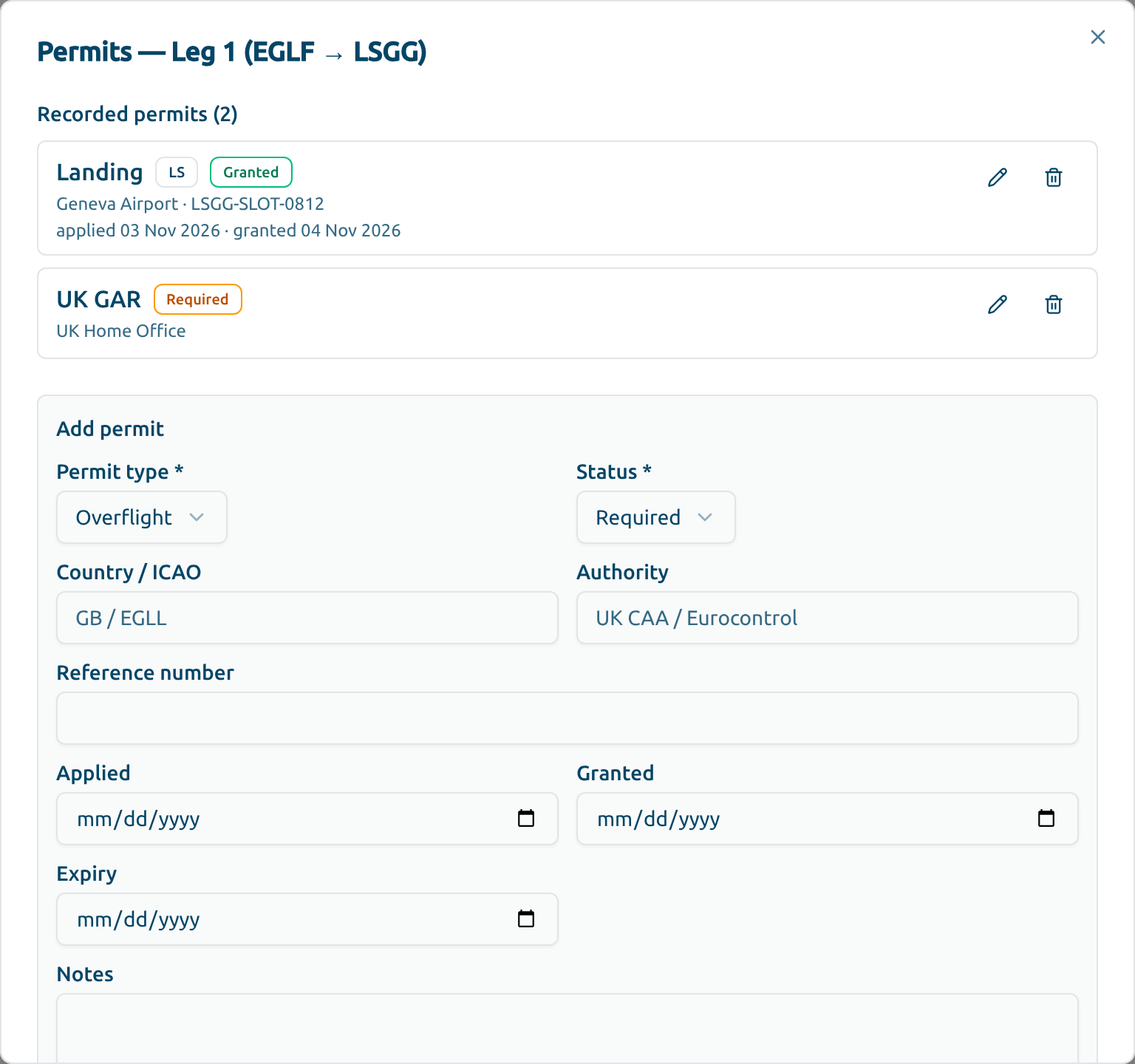
- The dialog lists Recorded permits and has a form to add or edit one.
How to record a permit
- Choose a Permit type: Overflight, Landing, Diplomatic, Customs, Slot, UK GAR or US eAPIS.
- Choose a Status: Required, Applied, Granted, Denied or Not required.
- Add the Country / ICAO, Authority and Reference number if you have them.
- Add the Applied, Granted and Expiry dates. A granted permit needs a granted date.
- Click Add permit (or Save changes when editing).
How permits show on the checklist
| Status | Checklist |
|---|---|
| Required | Blocked: required but not applied for |
| Applied | Pending: awaiting the authority's response |
| Granted | Ready |
| Denied | Blocked |
| Not required | N/A |
If no permits are recorded, the checklist says "No permits recorded". The app does not decide whether a route needs one. UK GAR and US eAPIS records are left out of this group and judged under Border & passports instead.
Border filings: UK GAR and US eAPIS
The app works out from the departure and arrival countries whether a leg needs a filing:
- •UK General Aviation Report (GAR) for a leg to or from the UK. The app checks it was submitted between 48 hours and 2 hours before departure.
- •US eAPIS manifest for a leg to or from the US. The app checks it was submitted at least 60 minutes before departure.
To record one:
- Add a permit of type UK GAR or US eAPIS.
- Enter Submitted at (UTC).
- Put the receipt in Reference number.
If a leg has more than one filing of the same type, for example after re-filing, the most recent one decides the check: the latest Submitted at (UTC), or the most recently recorded if none has a submitted time.
| What the checklist says | Why |
|---|---|
| Not filed yet, with the window | No filing recorded, or it is still marked Required |
| Filing was rejected | The filing is marked Denied. File again |
| Submission time not recorded (Can't check) | The filing has no submitted time |
| Filed more than 48 h before the current departure time | The departure moved. File again |
| Filed late | Submitted after the window closed |
| Awaiting the receipt reference (Pending) | Filed in time, but no receipt yet |
| Filed, with the receipt | Ready |
These checks are legal rules: a filing that is missing, rejected or outside its window stops the trip being released. A US eAPIS manifest must also be approved before release.
Flights between the UK and Ireland, the Isle of Man, Jersey or Guernsey need a GAR too. Filed 12 to 48 hours before departure, it is valid at any airfield. Filed less than 12 hours before, it is valid only at an airfield designated for police purposes, which Airlogical does not record, so it shows Can't check. Flights between Great Britain and Northern Ireland need no GAR.
Some routes cannot be checked:
- •A leg to or from a named landing site, or an airport whose country is not known, shows Can't check.
- •A leg with no STD or ETD shows Can't check.
A leg between two airports in the same country needs no filing.
Passports
Passports are checked on any leg that crosses a border, and on any leg where the country of either end is not known:
- •Passengers: the passport expiry entered in the trip's Passengers card, for each passenger travelling on that leg.
- •Crew (PIC, SIC and cabin crew): the latest passport expiry among the person's passport documents in their crew documents. Only the expiry is read.
A passport that has expired before the flight, or expires before the trip's last day, stops release. A passport that expires less than six months after the trip is an operator-policy warning. No expiry on file shows Can't check.
On a leg that arrives in the Schengen area from outside it, anyone who is not an EU, EEA or Swiss citizen also needs a passport issued within the last 10 years and valid for 3 months after the trip's last day. A passport that does not meet this stops release. The check uses the passenger's Nationality and Passport issued date (or, for crew, the nationality and issue date on their records; neither is shown). If either is missing, or the nationality is not recognised, it shows Can't check. Type the nationality as a country, a two-letter code or a word such as "British".
Who can do this
Anyone with Operations read and write access on the aircraft can add and change permits and passengers. The account owner and admins can always.
Tips
- •If the departure time changes, check the GAR again. A filing made more than 48 hours before the new time is flagged.
- •Mark a filing Not required if you have confirmed the route does not need it.