A pilot's medical is recorded as a qualification on their crew profile. Airlogical uses it to check, leg by leg, that the pilot holds a medical that is valid on the flight date and that any limitations on it are met. Medical details are private, so most people only ever see whether a medical is valid.
Where to find it
Crew, then open the crew member, then the Qualifications tab. Medicals appear there as Class 1 Medical, Class 2 Medical or LAPL Medical. A cabin crew member's aero-medical assessment is recorded the same way (see Cabin Crew).
How to record a medical
- On the Qualifications tab, click Add qualification.
- Choose Class 1 Medical, Class 2 Medical or LAPL Medical as the type.
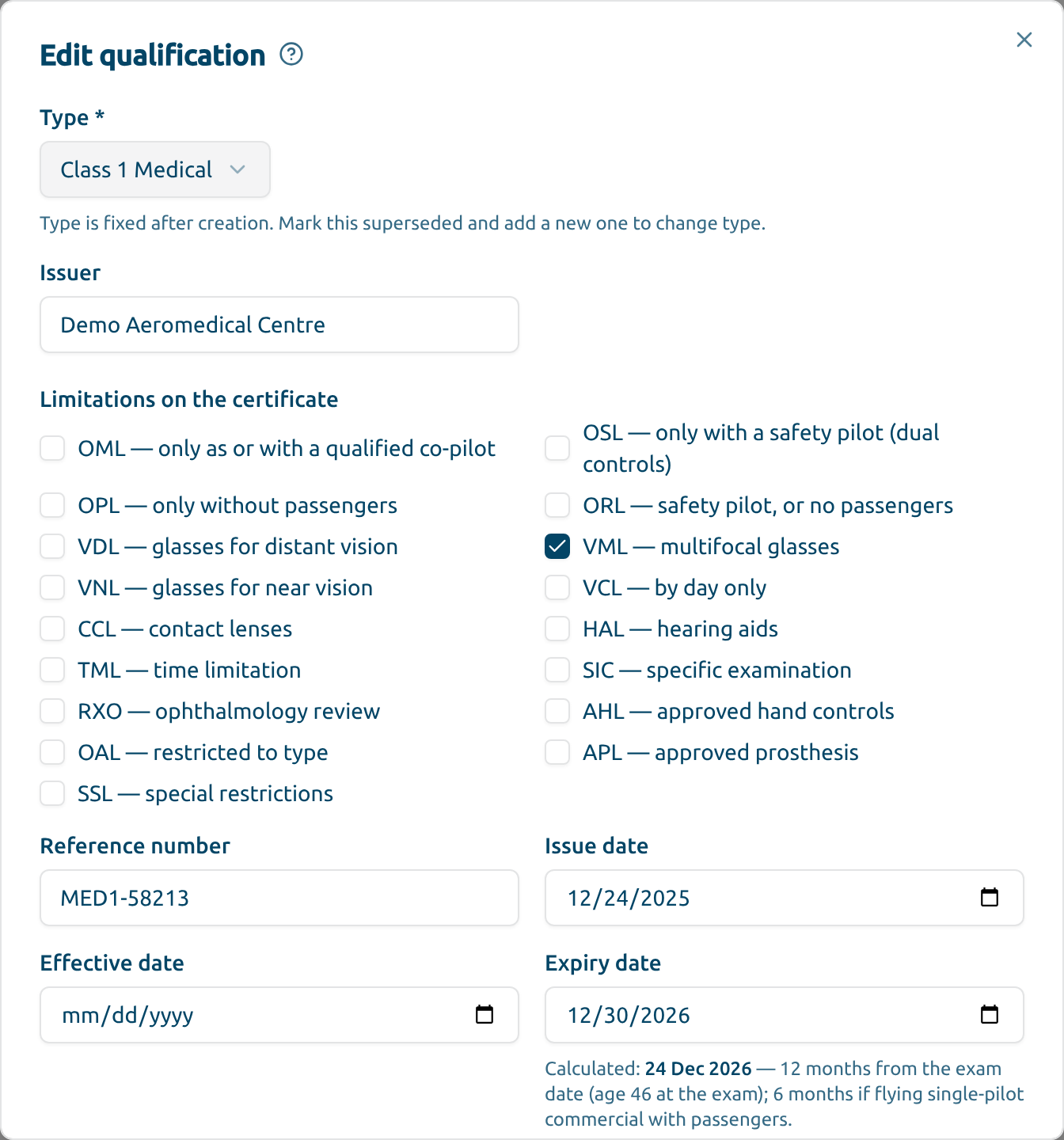
- Under Limitations on the certificate, tick every code printed on the medical.
- Enter the examination date as the Issue date.
- Enter the Expiry date from the certificate, or use the calculated date (see below) once you have checked it.
- Click Add.
When the next medical is issued, add it as a new record and set the old one to Superseded. The old record's expiry is what the calculation uses to decide whether the new one runs from the old expiry date.
The calculated expiry
The validity of a medical depends on the pilot's age at the exam, so the form needs the crew member's date of birth. If you can see their personal details and a date of birth is recorded, the form shows a calculated expiry and the reason for it, for example "12 months from the exam date (age 45 at the exam); 6 months if flying single-pilot commercial with passengers."
- •Class 1: 12 months, or 6 months at age 60 or over. For ages 40 to 59 the form adds a reminder that it is 6 months if flying single-pilot commercial with passengers.
- •Class 2: 60 months under 40 (not beyond the 42nd birthday), 24 months from 40 to 49 (not beyond the 51st birthday), 12 months at 50 or over.
- •LAPL: 60 months under 40 (not beyond the 42nd birthday), 24 months at 40 or over.
- •A medical renewed up to 45 days before the previous one expires runs from the previous expiry date.
If you cannot see the date of birth, or none is recorded, the form says so and you enter the expiry from the certificate. The certificate's date is always the record.
Limitation codes
The codes you tick are checked on every leg the pilot flies while that medical is active and in date:
| Code | What Airlogical checks |
|---|---|
| OML | Another pilot is assigned, and that pilot does not also have OML |
| OSL | Another pilot is assigned |
| OPL | The leg carries no passengers |
| ORL | Another pilot is assigned, or the leg carries no passengers |
| VCL | The leg is not a night flight |
| VDL, VML, VNL, CCL, HAL | A reminder that the pilot must carry the required glasses, lenses or hearing aids |
If the passenger count or day/night is not recorded on the leg, the check says it cannot tell rather than passing. The other codes are stored on the record but not checked against legs.
What the leg checks show
| Result | What happens |
|---|---|
| No medical on file, or none of the class the flight needs | The crew assignment is refused |
| Medical not valid on the flight date | The crew assignment is refused |
| Medical has no expiry date on file | Shown as not checked |
| Valid, but expires within 30 days of the flight | Warning |
| Class 2 or LAPL on an NCC or SPO aircraft | Warning to check the pilot's privileges, because a pilot paid to fly needs Class 1 |
| No medical rule is set up for the operation (the FAA categories) | Shown as not checked, verify manually |
The class needed depends on the leg's operation type, or the aircraft's Operational category when the leg has none: NCO accepts Class 1, Class 2 or LAPL; NCC and SPO accept Class 1 or Class 2; ORO accepts Class 1 only. Medical limitation checks stop release when a limitation is not met.
Who can see medical details
Medical records (Class 1, Class 2, LAPL and the cabin crew aero-medical assessment) can be read only by:
- •the crew member themselves
- •account owners and admins
- •crew with Read & write on the Compliance section for that crew member's aircraft
Everyone else with access to the aircraft:
- •does not see the medical on the crew member's Qualifications tab
- •sees only Valid, Expiring or Expired in the Medical column of the Compliance page, with no class or date
- •when assigning crew to a leg, has the medical checked only when the assignment is saved
On a leg's readiness checks everyone, including those who can see medical details, sees the medical result worded as valid or not valid on the flight date, with no class or date. Limitation checks never name the medical's class or date either. The date of birth used for the calculation is part of the crew member's personal details, which have their own, separate visibility rule.
Who can change medicals
Adding or editing a medical follows the same rule as any qualification: Read & write on the Aircraft section for that aircraft, or account owner or admin. Someone who can add a medical but cannot see medical details will not see it on the Qualifications tab once it is saved, so cannot edit it afterwards. See Crew Qualifications.